ATN Slicer
OrcaSlicer + pre-flight + AI + physics.
A full OrcaSlicer fork with our 40+ rule pre-flight engine built in — plus, on the paid tiers, AI Diagnose & Ask beside the gcode preview and a Workshop physics suite that predicts warping and heat build-up before you print.
What you get above stock Orca — free
Download it, keep it, no subscription. Three things Orca doesn't do, on by default.
A full OrcaSlicer — free
Same hotkeys, same project files, same Bambu / Klipper / Prusa support. Drop-in replacement, nothing to migrate — it reads your existing profiles on first launch. Free to download and keep, and we merge upstream Orca changes regularly.
FreeMid-air detection — built in
Every slicer warns about overhangs; none tell you when it's about to extrude into thin air. ATN Slicer walks the actual tool-paths and flags any extrusion laid down with nothing beneath it — the spots that fail even with supports on — as red markers right in the Preview.
FreeTop-support-layer fan control
Cool only the interface layer where support meets the part — so the surface releases cleanly and looks sharp — without over-cooling the rest of the support and weakening it. A small, genuinely useful ATN addition, free for everyone.
FreePre-flight on every slice
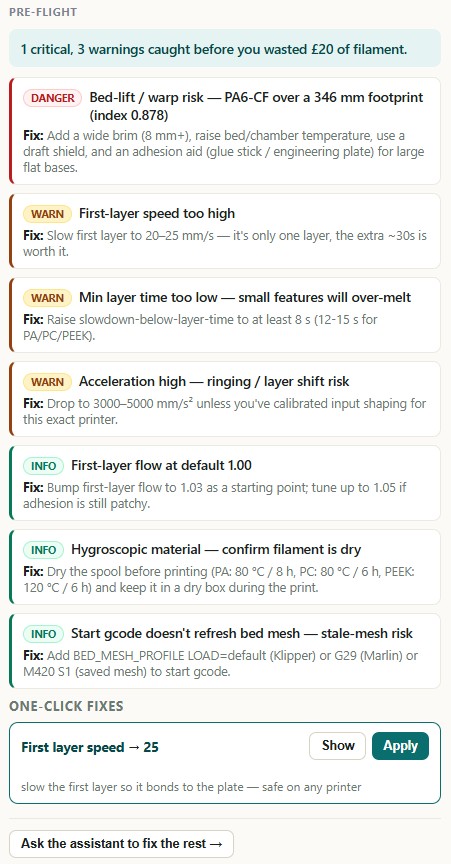
40+ deterministic checks run on the G-code after each slice: volumetric flow vs hotend, min-layer-time over-melt, supports-off-on-overhangs, chamber-required-for-PA, over-long bridges, footprint-vs-bed fit, a thermal read, and a plain-English explanation of every mid-air spot. Free accounts see a blurred teaser; Starter reads every finding.
Free teaser · Starter reads itRead the findings, then fix them without leaving the slicer
Starter unlocks the full pre-flight. Hobbyist adds one-click Apply and the AI panels.
Every recommendation is a button
Pre-flight doesn't just tell you the outer-wall acceleration is too high — it hands you the corrected value with an Apply button that writes it straight into the profile. Fix a slice in seconds, re-slice, done.
Material-aware, too: the checks pull from our distilled vendor datasheets, so the numbers for Polymaker Fiberon PA6-CF20 (or any catalogued filament) match the manufacturer's spec, not a generic default.
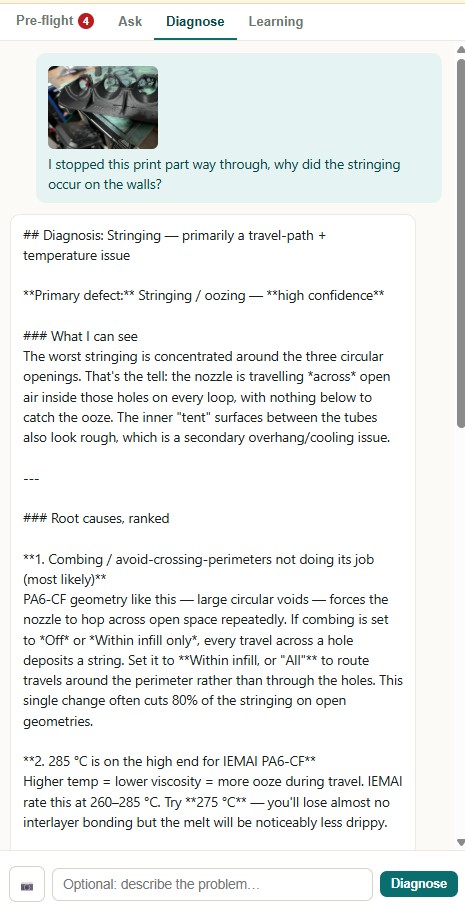
Diagnose a failed print — without leaving the slicer
Print didn't come out right? Photograph it with your phone and drop it on the Diagnose panel. The full Vision-AI pipeline runs — same curated knowledge base, same importable settings patch — with the exact slice settings auto-attached, so it reasons about what you actually printed.
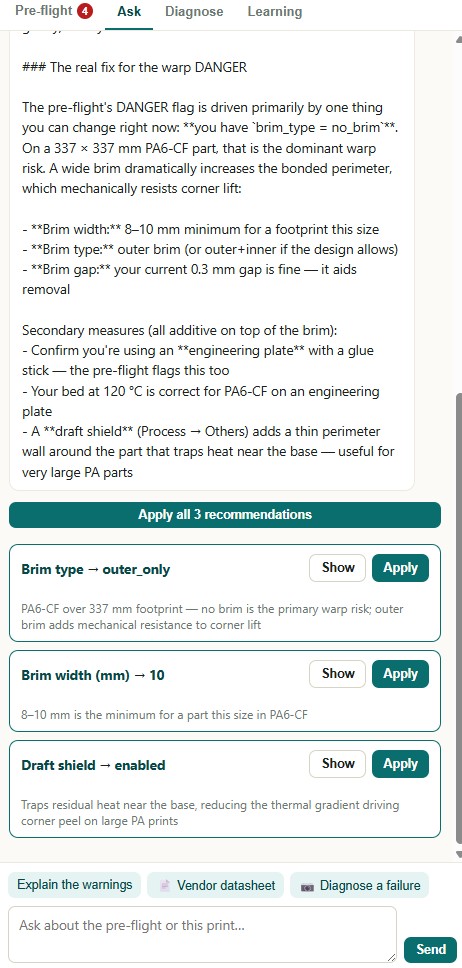
Ask anything, and it already knows your plate
"Why does this part need supports?" "Cheapest material that survives 80 °C?" The Ask panel is the same expert AI as the website — but every question already knows what's on the build plate and the settings you sliced with. No copy-pasting your config into a chatbot.
Engineering-grade physics, on your desktop
Workshop turns the slicer into a print-simulation tool. It runs a licensed local engine that predicts how the part will actually behave — before a gram of filament is laid down.
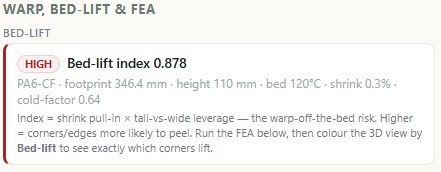
A warp scorecard for the part
A reduced-FEA solver models the part cooling and contracting layer by layer, then scores its warp and bed-lift risk — accounting for the material's thermal expansion, modulus and crystallisation shrinkage. See at a glance whether that big flat PA-CF bracket is going to curl off the plate.
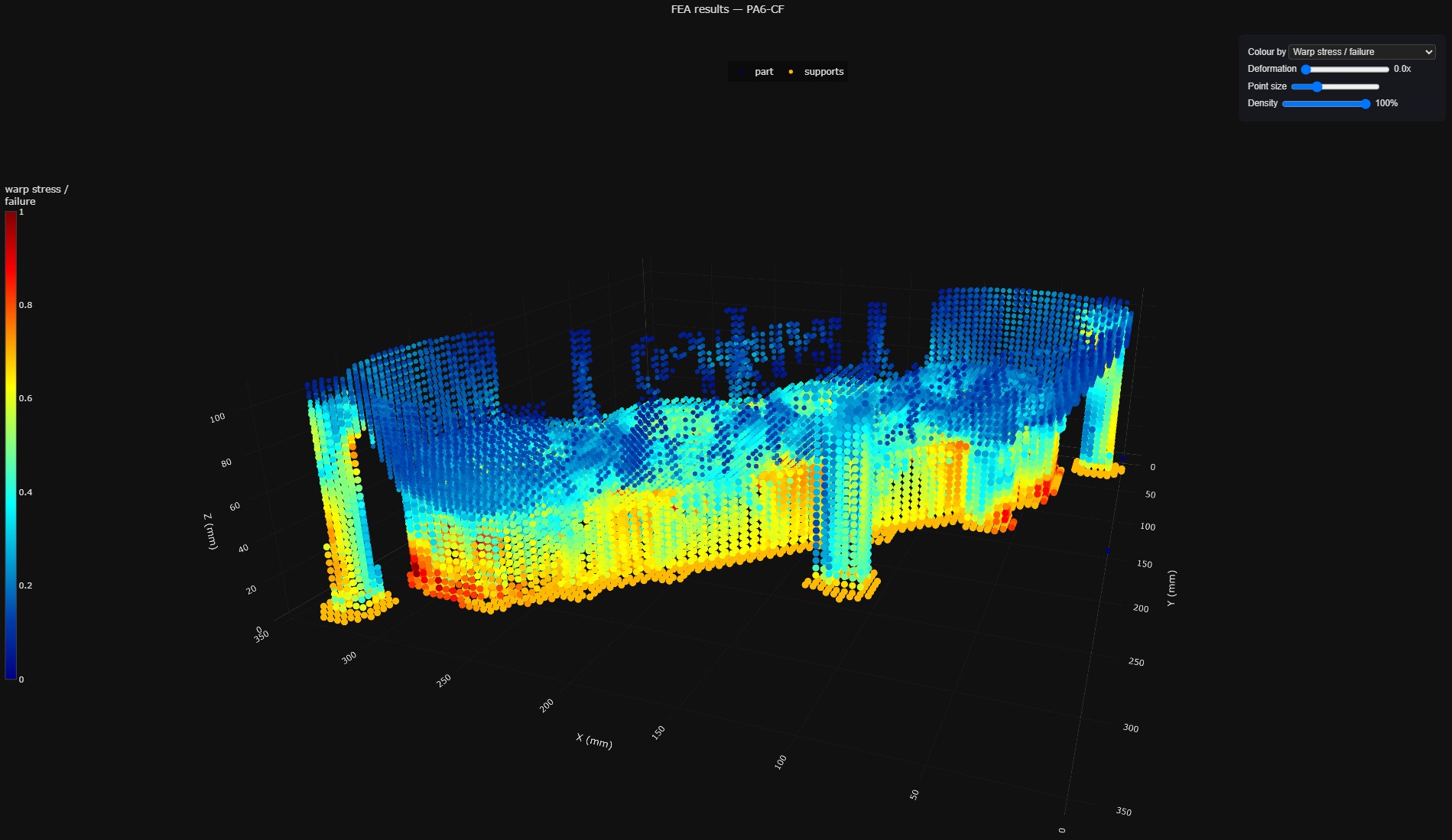
See where it will move, in 3D
Not just a number — a colour-mapped 3D view of predicted displacement across the part, so you can see exactly which corners lift and which features distort. Reorient, add a brim, or change material and re-check before you commit.
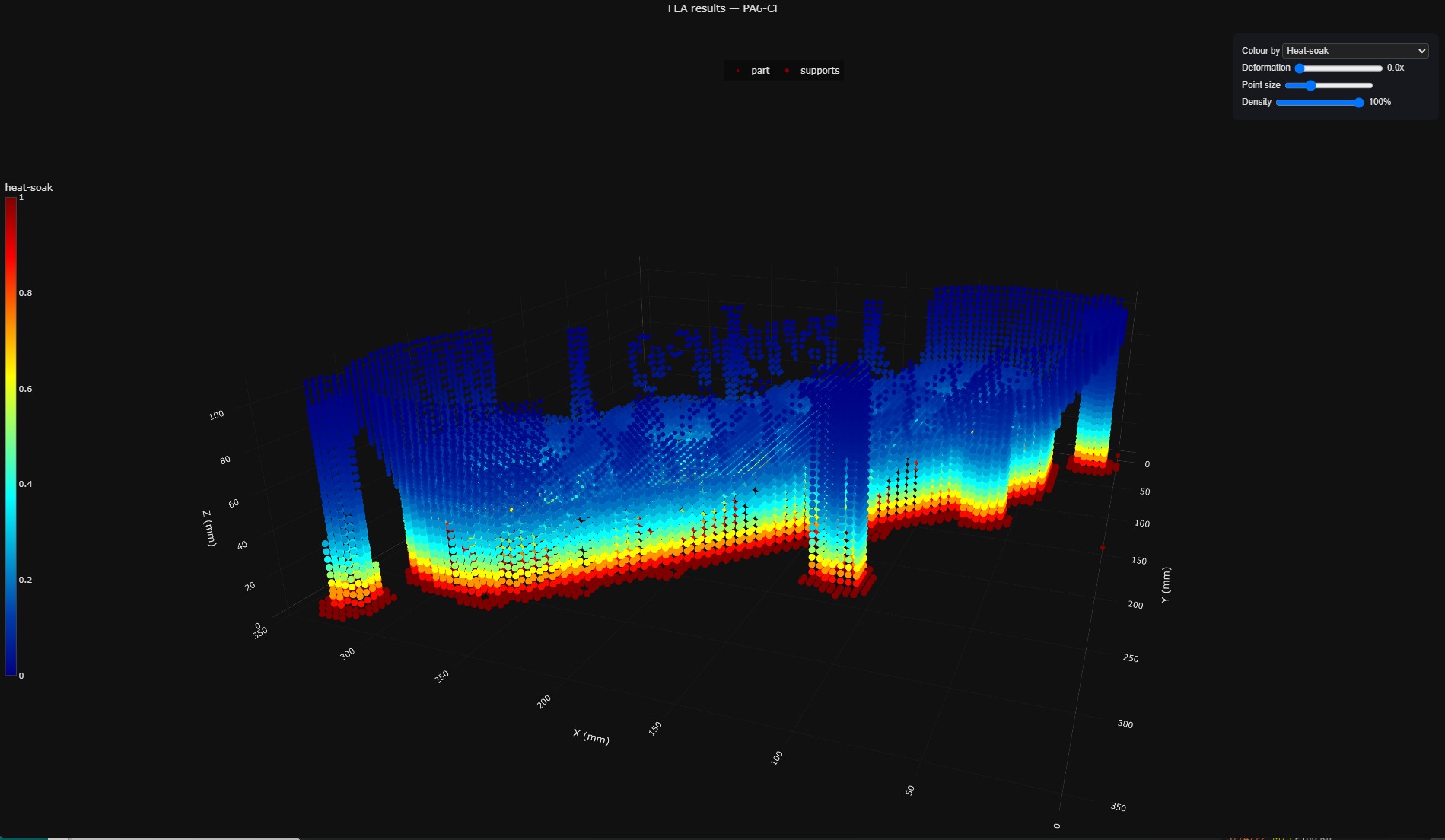
Heat-map the print, catch weak layers
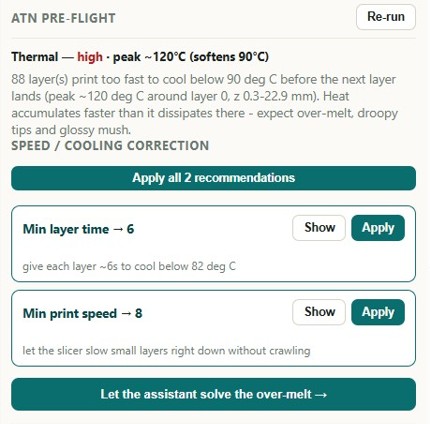
A spatial thermal model walks the toolpath and tracks how hot each region stays between layers — the heat-soak that causes over-melt, droopy tips and glossy mush. It also flags interlayer-bond and delamination (Z-bond) risk where layers land too cool to fuse. See the hotspots as a per-layer heat-map, located in X/Y/Z.
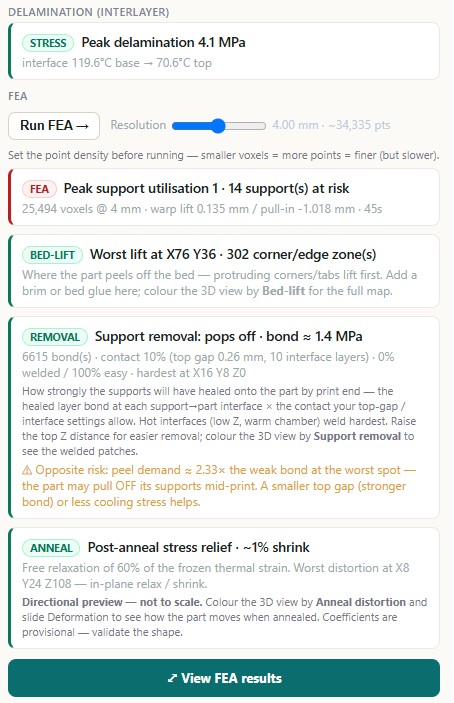
Every risk as a number you can act on
One readout with the hard figures behind the flags: peak interlayer (Z-bond) stress and the layer height it strikes, the warp index and bed-lift driver, plus the material's shrinkage, CTE and modulus. See exactly why a part is at risk — and watch the numbers move as you change orientation, material or a setting.
Tune every layer's speed to its thermal sweet spot
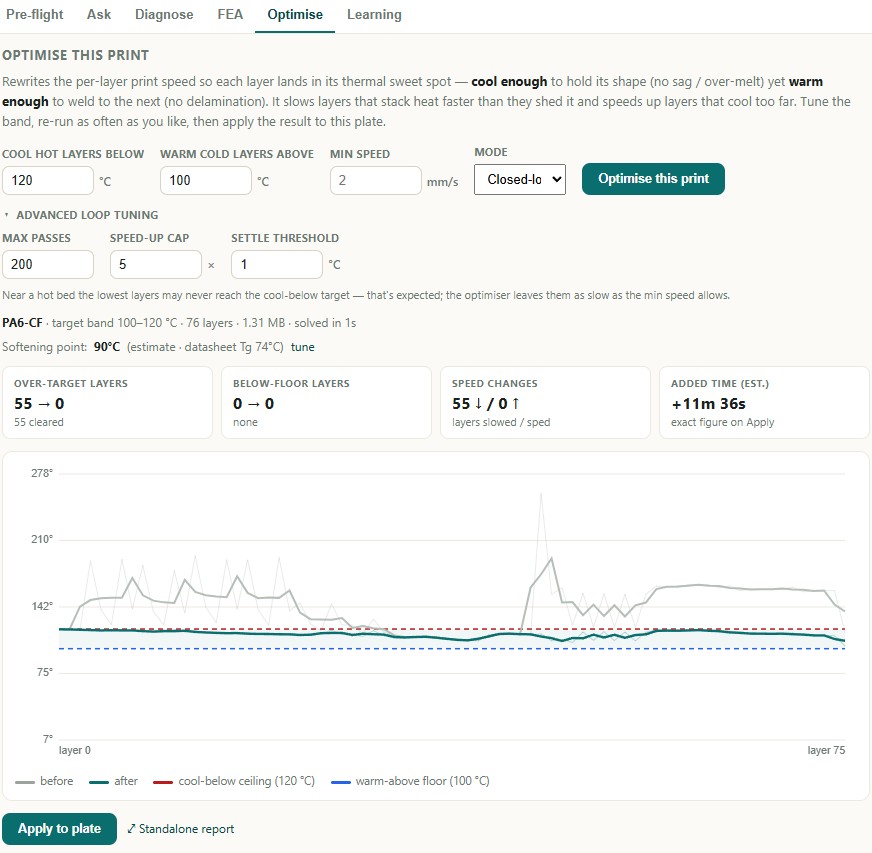
The thermal model doesn't just warn you — it fixes the print. Optimise rewrites the per-layer print speed so each layer lands cool enough to hold its shape (no sag or over-melt) yet warm enough to weld to the next (no delamination). It slows layers that stack heat faster than they shed it, speeds up layers that cool too far, tells you the exact time cost, and applies the result straight to the plate. In the run below it took 55 over-heated layers to zero for +11m of print time — re-run and re-tune as often as you like.
It learns from your prints
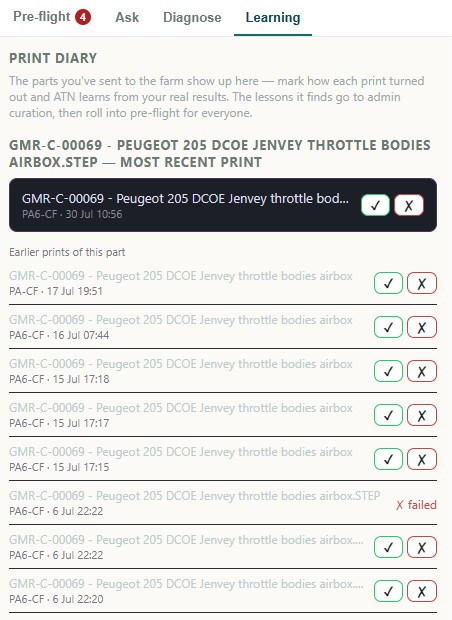
Log a result against a slice and the Learning tab distils what worked and what failed across your own history — surfacing the common causes behind your failures and feeding them back as sharper pre-flight checks tuned to your printers and materials.
Which plan unlocks what
The slicer itself is free to download — features inside are gated by your subscription.
- Free ATN Slicer download
- askthenozzle.com web tools
- Read the full in-slicer pre-flight — every finding + recommendation
- One-click Apply
- AI Diagnose / Ask
- Workshop physics suite
- Everything in Starter
- One-click Apply of every recommendation
- AI Diagnose + Ask inside the slicer (gcode-aware)
- Material-aware, datasheet-backed checks
- Workshop physics suite
- Everything in Hobbyist
- Warp FEA + 3D displacement view
- Heat-soak thermal heat-map
- Delamination / Z-bond risk
- Optimise — auto per-layer speed tuning
- Learning diary
- Local ATN Engine + priority support
Common questions
Why a fork? Why not just a plugin?
Will I lose my existing OrcaSlicer profiles?
Does it support my Bambu / Klipper / Prusa printer?
Do the checks cost credits?
What runs the Workshop physics — is it cloud?
What if I cancel my subscription?
When can I download it?
Ready?
Free Windows download. Subscribe to read the full pre-flight (Starter), unlock one-click Apply + the AI panels (Hobbyist), or add the physics suite (Workshop).
Download for Windows →